This article builds in the previous article, please at least skim that article first.

Strategic Operations Division Report 2-6-2947
February 6, 2017
Hard Times – Lord Corwin (part 4)
February 6, 2017Triangles
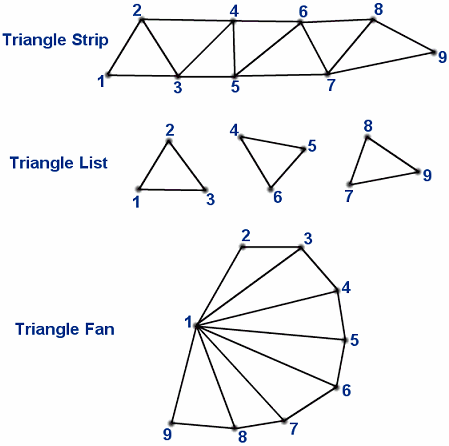
Triangles, almost all of the model and visuals you see in games and graphics are made of these pieces of geometry. Previously we mentioned that points are one vertex, and you can draw a line with a pair of vertices, or a series of vertices where you connect each one into one jagged line. Triangles can be made from three vertices, Like lines there are a few other ways to define them, mostly for the purpose of saving memory.
In the example image we number the vertices as the order they are stored. Each example image has nine vertices, but the triangle strip and triangle fan define four more triangles than the triangle list. Instead of it taking three vertices to define a triangle, it takes one vertex, plus two starting vertices. Like the line, which used the vertex you provide and the previous vertex to draw the next segment, the triangle strip uses the previous two. The triangle fan uses the previous vertex, the first vertex, and the provided vertex. This reduces the number of vertices by an order of magnitude, but each vertex can be dozens of bytes; that’s still a significant amount of memory for complex models.
Duplicated Vertices
When you’re drawing a model, there’s an idea that a model is ‘closed’, a closed model doesn’t have holes that let you see behind the triangles that make the model’s surface. You can find examples of when this fails if you find rocks in the terrain of games that don’t have a back, allowing you to see straight through to the rock. Because a model is made of a bunch of triangles pressed against each other, many of the vertices will be shared. We can use an index buffer to reduce the duplication in the vertices.
Buffers
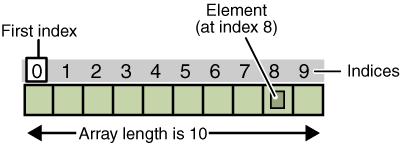
We need to cover what a buffer is first. A buffer is a fancy word for a chunk of memory, we’ve been defining vertex buffers this whole time, and we’ve been storing vertices in them. Each slot in any buffer can be identified by an index, that index is how far from the start of the buffer the thing is. So, if you want the second item, the item you want is 1 position away from the start, so the index of the second item is 1. The index of the first item is 0, as it’s the start of the buffer. One of the core concepts about buffers is you don’t care how large each item is, as you’re working with the number of that thing from the start. This idea of a buffer comes up a lot in computers, the idea you’re working with a bunch of a thing, each laid after the next.
ALL of your computer’s’ memory and storage use this pattern, I’ve been avoiding firm statements but this one is true across the board. There are different names for different styles of memory, each has special characteristics. For instance, buffers are designed to have memory that can move to another place, such as over a network, between processes, or to and from a GPU. When you hear about memory you hear about things in terms of bytes. Your computer uses the index of an object in bytes to tell where things are in memory, and the index for ram has a special name, they get called addresses. If you hit an error and the error message contains 0x00000000 or 0x0000000000000000, where the 0’s were a bunch of numbers and letters (like 0x00000000FFFFFFFF), that is an address, or the index of something in your system’s ram (There are systems in your PC that make this not exactly true, but the concept is correct).
It’s Not The Size That Counts
Earlier I brought up that buffers don’t care how large their objects are, you access them by an index. But, if your memory is all made of a single buffer of bytes, how’re you making multi byte vertices in there? The way you make chunks of buffers into larger item buffers is taking the start of the buffer, its address, and adding the index multiplied by the number of smaller things in a single one of the larger things. From there you access each larger object by the address + (size * index). The strange bit is, almost all of the hardware in your machine doesn’t work in terms of bytes either, and does this math and works with much larger segments of memory. Even your CPU, that runs the code written in terms of bytes, runs on larger segments.
CPU’s normally run on either four or eight bytes, or, put another way, 32 or 64 bits. The size they work with is normally the maximum size of address they can easily access, in 32 bits the maximum index is 4,294,967,295; in bytes that’s around 4gb. That’s why up until 64 bit processors, that was the maximum memory size of a program. The actual memory limit of a 32 bit process is a lower than that, due to restrictions in the hardware and operating system. 32 bit windows for instance has a maximum process size of 2gb. When dealing with a 64 bit process, the maximum address is 18,446,744,073,709,551,615 bytes, or 15.5 exabytes per process. The real world limit is lower than this for the same reasons, hardware and operating systems. However, even though the memory limit is higher for 64 bit processes, programs still try to reduce their memory cost for CPU performance and cache reasons.
This doesn’t just affect the processor, the size of an address in a 64 bit process is twice as large. If you have a buffer of addresses in a 32 bit process, it’s going to be half the size of a buffer containing the same indexes in a 64 bit process (On a side note, I know that because of how buffers are used they’re never supposed to store memory addresses. People who know specific of this will call me out, but buffers are our word for ‘blob of memory’. Putting addresses in a buffer will be covered later.). This doubling of memory is why unless you have over 4gb of ram, going 64 bit is a bad idea, 64 bit processes are going to use up more of that 4gb than 32 bit processes. We’re mostly gamers though, so I’m guessing we’ve all got a lot more ram than 4gb. I’ve got 16gb on this machine, 32 on my other, and my brother’s got a machine with 128gb of ram in it. In cases like these, 64 bit is a good choice, as the memory limit increase is worth the overhead. Also, if you notice you’re running a 32 bit game that has stability issues and you notice it’s near that 4gb limit, try turning the texture quality down. Textures in games are uncompressed images, normally a few megabytes in size. Turning down the texture quality uses smaller images, and reduces the memory cost of the game.
Index Buffers
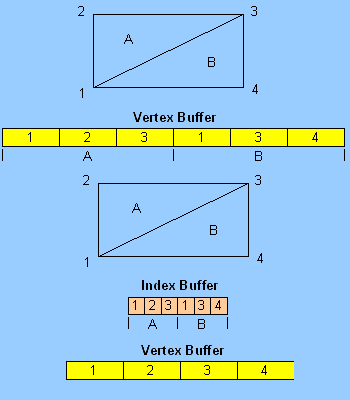
For triangles, as mentioned, we’ve been storing vertices in vertex buffers, the point of an index buffer is to provide a way to reduce the duplication of the vertices in the buffer. As with your system’s ram being indexed by an address, an index buffer stores the indexes of the vertices in a vertex buffer. An easier way to think of this the shorthand used in restaurants. Menu items in a restaurant have some combination of a name, description, or picture. When a waitress, waiter, or person-behind-the-counter they don’t enter or write down the whole name and description, or sketch a picture of your order. Instead they use a system of shorthand to refer to the menu item you’re trying to order. In this example each menu listing is a vertex, something complex that isn’t feasible to store multiple times. Each entry in the order-takers ticket is an index, referring to a menu item. If you’re in a restaurant that numbers each item this comparison may make a bit more literal sense, but even if the menu-index is a small word the analogy still holds. In a computer we use the index of the vertex in an index buffer because computers are efficient at referring to a vertex from its index.
Mix And Match For Maximum Savings
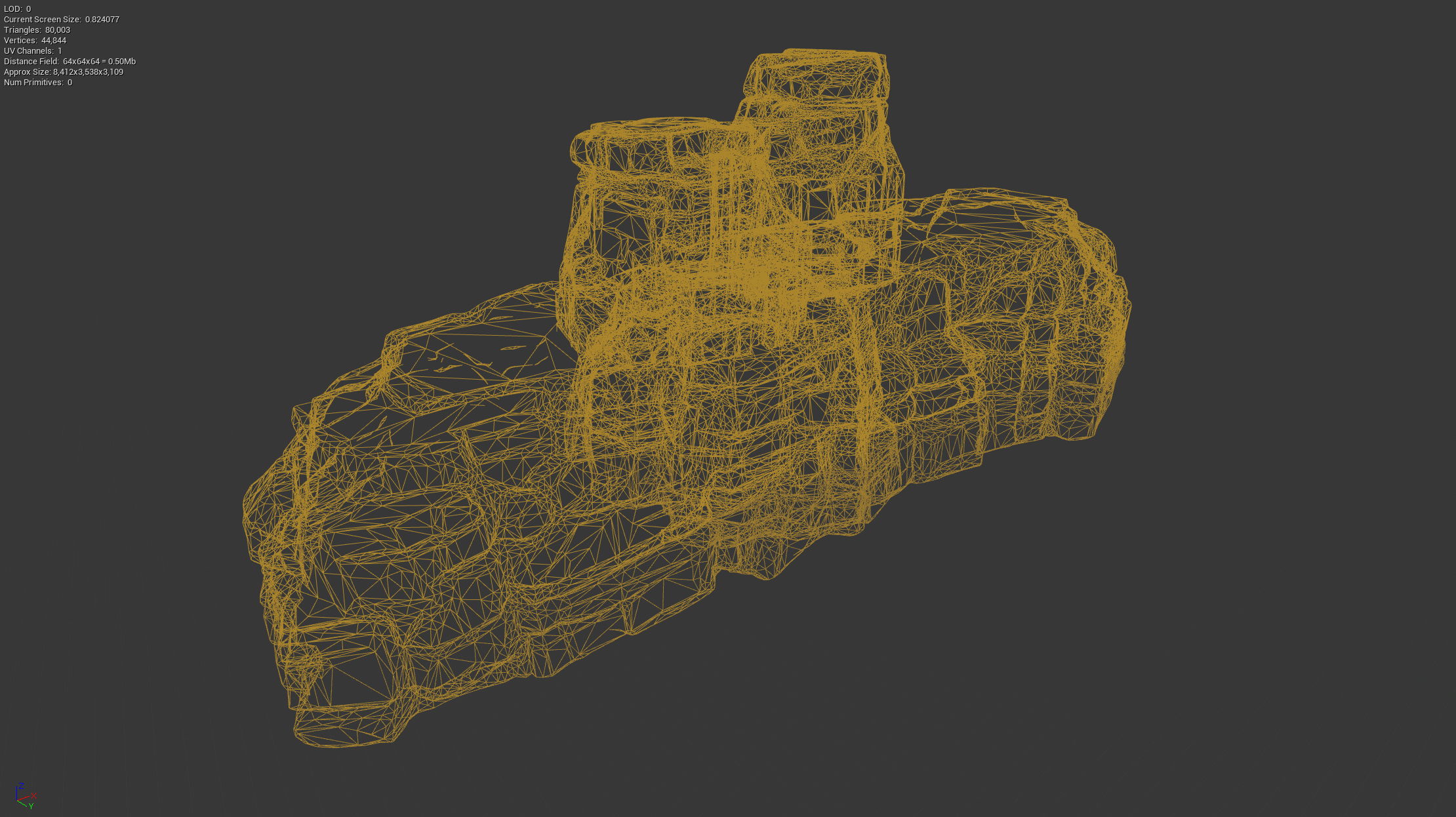
By themselves index buffers can save memory if vertices are duplicated many time, but they can be freely combined with using line strip and triangle list formats for even more savings. Index buffers can also be used with lines, line segments, and even points to varying amounts of savings. You use an index buffer if the cost of the vertex and index buffers is less than the memory cost of the size of the un-indexed vertex buffer. Earlier I mentioned that ram indices are called addresses, and can be 32 or 64 bits. In an index buffer, the indices can be either 16 or 32 bits. 16 bits gives us a 65,536 possible vertices that the index buffer can point to. In most cases 16 bits is good enough, but the number of vertices can be deceptive. Take this rock from ARK, it’s made of vertices and looks fairly detailed, and that comes at a cost of 44,844 vertices. In this case a 16 bit index would hopefully be used, but models can easily get more complex than this, and require a 32 bit index.
When Indices Go Bad
I also mentioned that addresses should never be put into a buffer, but now I’m putting indices into a buffer. Considering we’ve been implying addresses and indices are very similar, it seems like it would also be a bad idea. Technically it is a bad idea, if you only had an index buffer. However, if you send both the index buffer and the vertex buffer the index buffer is pointing into it is considered OK. This is because the indices by themselves are useless, they are seemingly random numbers, but with the vertex buffer they have meaning. With the restaurant analogy, if there isn’t a menu to reference and the shorthand isn’t descriptive enough, chances are you won’t get what you wanted; where a known menu should result in more reliable meals. This lack of context is also why it is considered a bad idea to send addresses through a buffer, buffers are normally to send data to things outside of your process, places that don’t have access to your processes memory. If you sent all of your application’s memory along with the buffer, then the addresses would have context… but sending all of your application’s memory is normally considered a security issue, if not impossible. At the same time, the shutdown style ‘hibernate’ is done by writing all of your process’s memory (including addresses) onto a hard disk, through a buffer. This is OK because you still have all of your memory, the addresses still have memory to point to. Hibernate is possible because your operating system is doing the memory storing, and can override the restrictions.
Winding Around, And Around, And Around
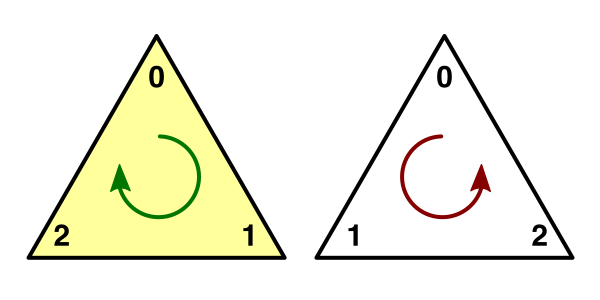
We’re almost to the point of drawing these triangles, but there is one more performance improvement. When you are defining triangles, the order the three vertices are placed in the buffer matters. When you are drawing triangles, you choose a winding direction. Only the triangles that appear to be wound in the correct direction will be drawn. If you’re looking at the image here, if the triangle on the left is in front of you and you have a clockwise winding direction, you would draw the triangle. If you were on the other side of the triangle, the winding direction would be counter clockwise, and you would not draw the triangle. Winding direction is why when a camera ‘clips’ into an object in a game, you can see through the other side of the model. This ‘backface culling’ is done to reduce the cost of drawing triangles. In most models, such as a characters, only half of the model’s surface is facing the camera. The technique allows the system to use linear algebra to tell what triangles are facing towards the camera, and the system won’t attempt to draw the triangles facing away. For models you can walk around and are in the world, this saves half of the triangles from trying to be drawn; for models in cliffs in the world, many of the models don’t have a mesh on the back of the model, so the savings is harder to calculate and this technique is not as useful. If you fall through the world in an MMO, you can see through the world at the enemies and other players running around above you, the reason you can see them is backface culling.
Actually Drawing a Triangle
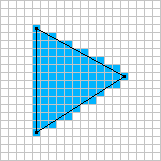
Now, we draw! Actually, there’s nothing special about triangles here. We have covered how to draw a line and triangles are the same way. We put a mesh in front of us and place the triangles past the mesh. From there color in the mesh cells (pixels) that you see the triangles through. To pick the color to fill the cell, you blend values from the triangle’s points. The math gets more advanced with three vertices, there are at least five different styles of blending the values ranging from picking a value from one of the vertices and using it across the entire triangle, to a technique called perspective interpolation.
Where Too Next
So far we’ve found ways to save and draw a model we have created in Maya or some other modeling program. Next time let’s see other ways we can save in memory and processing, leading into how modern engines can do things like ‘infinite’ worlds. Until then, if you have questions or comments, leave them here or message me on discord as Earthmark@0314.